
Low Battery Warning
If your fall sensor battery is running low, INS LifeGuard may call you and let you know. You can either request a new pendant (postage fee may apply) or replace the battery yourself.
What You’ll Need
- Your fall sensor pendant
- Philips head or flat head screwdriver (depending on which fall sensor you have)
- The correct battery (can be found via online retailers or battery stores):
|
|
LifeGuard SmartHome LGX Fall Sensor requires battery type CR2477
|
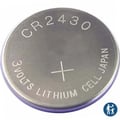
SmartLink Medi-Guardian MKII Fall Sensor requires CR2430
|

Battery Replacement - SmartHome LGX Fall Sensor
Battery Type: CR2477
- Turn the pendant over to locate the battery door.
- Use a Philips head screwdriver to remove the back panel.
- Gently remove the old battery and dispose of it safely.
Never place batteries in household waste or recycling bins; take them to a battery recycling drop-off point.
- Insert the new battery with the positive (+) side facing up.
- Replace the back panel and tighten the screw.
- Press the button to trigger an alarm. When the operator answers, advise that you are testing after replacing the battery in your fall sensor.
Battery Replacement - SmartLink Medi-Guardian MKII Fall Sensor
Battery Type: CR2430
- Turn the pendant over to locate the battery door.
- Using a flat-head screwdriver, rotate the cover counter-clockwise until it unlocks, then prise the cover off.
- Gently remove the old battery and dispose of it safely.
Never place batteries in household waste or recycling bins; take them to a battery recycling drop-off point.
- Insert the new battery with the positive (+) side facing up.
- Replace the cover and turn it clockwise until it locks into place.
- Press the button to trigger an alarm. When the operator answers, advise that you are testing after replacing the battery in your fall sensor.
Call if you still need help
If you need assistance, call our friendly tech support team on 1800 870 410 — we’re here to help.